Guide to Operating Worcester Greenstar Life 8000 Boiler (2026)
Learn how to use your Worcester Greenstar Life 8000 boiler, adjust heating and hot water temperatures, top up boiler pressure, use Eco mode, reset common fault codes, and keep your boiler running efficiently.
The Worcester Greenstar Life 8000 boiler is a modern combi boiler that provides central heating and instant hot water. It is designed with a simple digital control panel, making it easy for homeowners to adjust settings and check the boiler’s status.
This guide explains everything you need to know about using your Worcester Greenstar Life 8000 in simple English. You’ll learn how to check boiler pressure, top up pressure safely, change temperature settings, understand Eco mode, reset the boiler, and know when it’s time to call a Gas Safe registered engineer.
Table of contents
- Quick Answer
- What Is the Worcester Greenstar Life 8000 Boiler?
- Understanding the Boiler Control Panel
- Best Temperature Settings
- What Is Eco Mode?
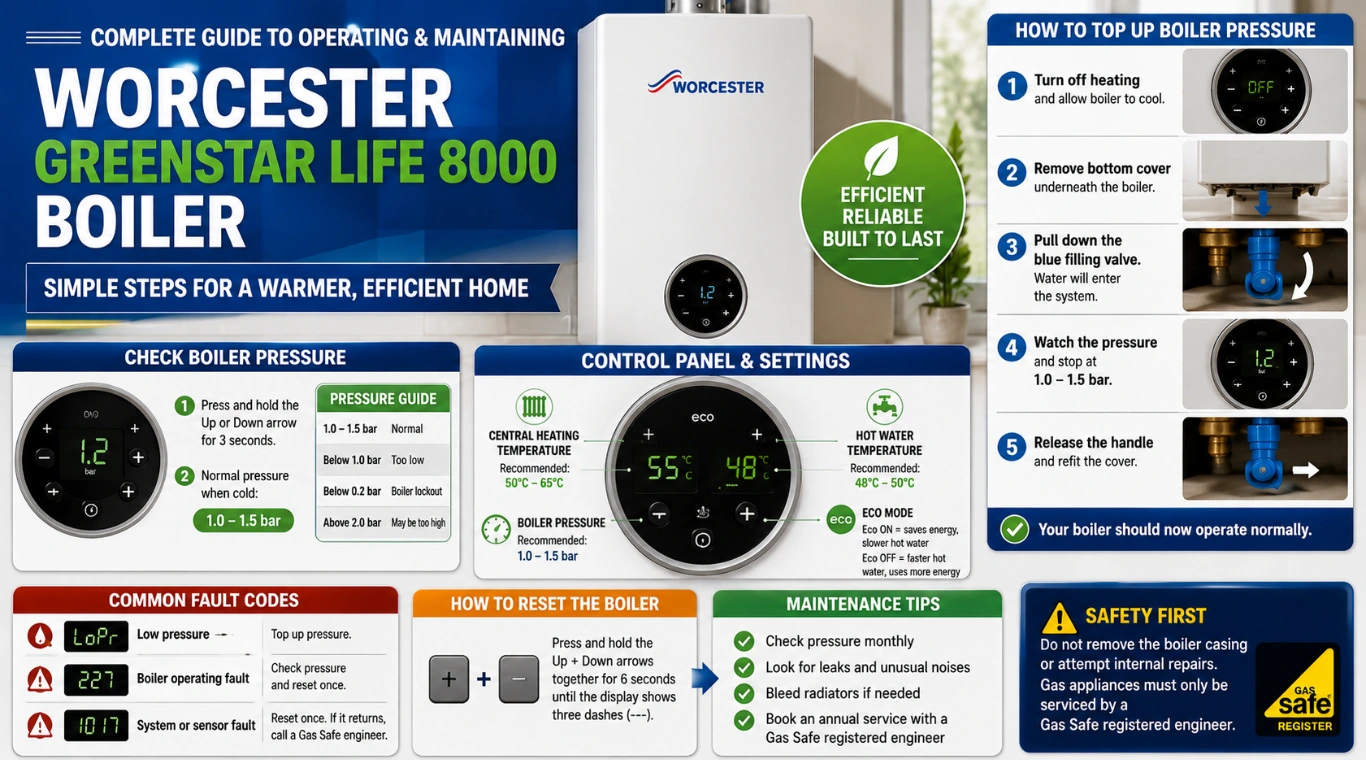
- How to Check Boiler Pressure
- How to Top Up Boiler Pressure (Step-by-Step)
- Common Worcester Greenstar Life 8000 Fault Codes
- How to Reset the Boiler
- Simple Maintenance Tips
- When Should You Call a Gas Safe Engineer?
- Conclusion
- Frequently Asked Questions (FAQs)
Quick Answer
If you need a quick overview, here are the most important settings for the Worcester Greenstar Life 8000 boiler.
| Boiler Setting | Recommended Value |
| Boiler pressure (cold) | 1.0 to 1.5 bar |
| Central heating temperature | 50°C to 65°C |
| Hot water temperature | 48°C to 50°C |
| Boiler reset | Hold both arrow buttons for 6 seconds |
These settings help your boiler run efficiently while keeping your home warm and your energy bills lower.
What Is the Worcester Greenstar Life 8000 Boiler?
The Worcester Greenstar Life 8000 is a combi boiler. This means it provides both central heating and hot water directly from one appliance. It does not need a separate hot water cylinder.
The boiler includes a digital display where you can:
- Check boiler pressure.
- Change heating temperature.
- Change hot water temperature.
- Turn Eco mode on or off.
- View fault codes if there is a problem.
Learning how to use these controls helps you get the best performance from your boiler.
Understanding the Boiler Control Panel
The control panel is located on the front of the boiler.
When the screen is in standby mode, simply press any button to wake it up.
The display shows:
- Central heating icon.
- Hot water icon.
- Boiler pressure.
- Eco mode.
- Fault codes.
- Current boiler status.
This information helps you quickly see whether your boiler is working normally.
Best Temperature Settings
Central Heating
Set the heating temperature between 50°C and 65°C.
- 50–55°C: Best for saving energy.
- 55–60°C: Comfortable for most homes.
- 60–65°C: Suitable during very cold weather.
Hot Water
Set the hot water temperature between 48°C and 50°C for everyday use. This provides comfortable hot water while helping reduce energy use and limescale.
What Is Eco Mode?
Eco Mode controls the hot water pre-heat function.
Eco ON
- Saves energy.
- Hot water takes slightly longer to reach the tap.
Eco OFF
- Hot water is available faster.
- Uses a little more energy while on standby.
Use Eco ON when you’re away from home or overnight.
How to Check Boiler Pressure
- Press and hold the Up or Down arrow for about 3 seconds.
- The display shows the pressure in bar.
Normal Boiler Pressure
| Pressure | Meaning |
| 1.0–1.5 bar | Normal pressure. |
| Below 1.0 bar | Pressure is low and needs topping up. |
| Above 2.0 bar | Pressure is too high and should be checked. |
Check the pressure once a month.
How to Top Up Boiler Pressure (Step-by-Step)
Time needed: 5 minutes
If the display shows LoPr or the pressure is below 1.0 bar, follow these steps:
- Step 1
Turn off the heating and allow the boiler to cool.
- Step 2
Remove the lower plastic cover underneath the boiler.
- Step 3
Locate the blue filling valve.
- Step 4
Pull the blue handle down to let water into the system.
- Step 5
Watch the display and stop when the pressure reaches 1.0–1.5 bar.
- Step 6
Release the handle and replace the cover.
The boiler should now operate normally.
Common Worcester Greenstar Life 8000 Fault Codes
| Fault Code | What It Means | What You Can Do |
LoPr | Low boiler pressure. | Top up pressure to 1.0–1.5 bar. |
| 227 | Boiler operating fault. | Check pressure and reset the boiler once. |
| 1017 | System or sensor fault. | Reset once. If it returns, contact an engineer. |
How to Reset the Boiler
- Make sure the boiler is switched on.
- Press and hold the Up and Down arrow buttons together.
- Hold for 6 seconds.
- The display will reset and restart the boiler.
Only reset the boiler once if a fault appears.
Simple Maintenance Tips
Keep your Worcester Greenstar Life 8000 working efficiently by following these checks.
Every Month
- Check boiler pressure.
- Look for visible leaks.
- Listen for unusual noises.
Before Winter
- Test the heating.
- Bleed radiators if needed.
- Top up pressure after bleeding radiators.
Every Year
Book an annual boiler service with a Gas Safe registered engineer to keep the boiler safe, efficient, and under warranty.
When Should You Call a Gas Safe Engineer?
Contact a professional if:
- The boiler keeps losing pressure.
- LoPr, 227, or 1017 keeps returning.
- The boiler leaks water.
- Heating or hot water stops working after a reset.
- You notice unusual noises or smells.
Do not remove the boiler casing or attempt internal repairs yourself.
Conclusion
The Worcester Greenstar Life 8000 boiler is easy to operate once you know the basic controls. Keep the pressure between 1.0 and 1.5 bar, use 50–65°C for heating and 48–50°C for hot water, and use Eco Mode when you want to save energy. Regular pressure checks and an annual service will help keep your boiler running efficiently and reduce the chance of unexpected breakdowns.
Frequently Asked Questions (FAQs)
Keep the pressure between 1.0 and 1.5 bar when the boiler is cold.
LoPr means the boiler pressure is low. Top up the pressure using the blue filling valve.
Set the central heating between 50°C and 65°C for the best balance of comfort and energy efficiency.
48°C–50°C is recommended for most homes.
Hold the Up and Down arrow buttons together for 6 seconds until the boiler restarts.
Key Takeaways
- The Worcester Greenstar Life 8000 boiler provides central heating and instant hot water, featuring an easy-to-use digital control panel.
- Maintain boiler pressure between 1.0 and 1.5 bar and set heating temperatures from 50°C to 65°C for efficiency.
- Use Eco mode to save energy, but expect hot water to be slightly slower at the tap.
- Monthly checks include boiler pressure and visual inspections; annual servicing is crucial for safety and efficiency.
- Call a Gas Safe engineer for recurring fault codes, leaks, or unusual noises.