How to Reset Worcester Greenstar Boiler: Step-by-Step Guide
A working boiler is important to keep your home warm and provide hot water. If you have a Worcester Greenstar boiler, it’s useful to know how to reset it when there’s a problem. Often, if the issue is small or temporary, a quick reset can fix it and get your boiler working again without needing to call a gas safety engineer.
Table of contents
- When Should You Reset a Worcester Greenstar Boiler?
- Where Is the Reset Button on a Worcester Greenstar Boiler?
- How to Reset a Worcester Greenstar Boiler – Step-by-Step
- Common Worcester Greenstar Error Codes That May Require a Reset
- Troubleshooting Tips Before and After Reset
- When to Call a Gas Safe Registered Engineer
- Frequently Asked Questions
When Should You Reset a Worcester Greenstar Boiler?
You should consider resetting your boiler when:
- The boiler has entered lockout mode, often indicated by a flashing blue light.
- You see fault codes like A1, E9, C1, or D1 on the display.
- There’s been a temporary issue such as a power outage or gas supply interruption.
- The pilot flame goes out or there’s an ignition issue.
- You’ve just resolved a minor issue like low pressure or air in the system.
Where Is the Reset Button on a Worcester Greenstar Boiler?
The reset control is usually found on the front control panel of the boiler. Depending on your model, it could be:
- A dedicated reset button often marked “RESET”.
- A thermostat dial that turns to a reset position.
- A recessed button that may need a pen or similar object to press.
Always check your user manual for the exact location and method relevant to your specific model.
How to Reset a Worcester Greenstar Boiler – Step-by-Step
Time needed: 5 minutes
Here’s how to perform a reset on most Worcester Greenstar boilers:
- Check the Manual
Before resetting, consult your boiler manual for any specific instructions or differences based on model.
- Locate the Reset Control
Find the reset button or thermostat dial on your boiler’s control panel.
- Perform the Reset
Depending on the type of reset control your boiler has, you can reset it in different ways. If it has a push-button reset, press and hold the button for 3 to 5 seconds. If it uses a dial reset, turn the dial to the reset position, hold it there for a short time, and then turn it back to your original temperature setting.
- Wait for Reinitialization
Once reset, wait a few minutes. The boiler should start a short cycle, and if successful, the fault code will clear and the flame will reignite.
- Test the Boiler
Check the hot water tap or turn up the thermostat to confirm the boiler is functioning properly.
Common Worcester Greenstar Error Codes That May Require a Reset
- A1 – Pump issue or low water pressure
- C1 – Fan not working
- E9 – Overheat lockout
- D1 – Return sensor fault
If these codes display briefly and disappear after a reset, it’s usually a minor issue. If they persist, professional help is needed.
Troubleshooting Tips Before and After Reset
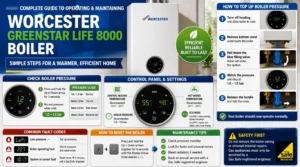
- Check boiler pressure – Should be between 1.0-1.5 bar.
- Bleed radiators if air is suspected in the system.
- Inspect condensate pipe in winter – it may be frozen.
- Look for leaks or physical damage.
- Ensure the pilot light or ignition is functioning (for older models).
- Listen for unusual sounds post-reset (e.g., gurgling or knocking).
When to Call a Gas Safe Registered Engineer
Resetting can solve minor problems, but if any of the following occur, stop and call a professional:
- Boiler pressure is too high or too low and can’t be adjusted safely.
- The boiler keeps locking out after resets.
- There’s a smell of gas or you suspect a gas leak.
- The reset doesn’t clear the error code.
- There’s no hot water or heating, even after a reset.
Final Thoughts
Resetting your Worcester Greenstar boiler is a useful skill that can save time and restore heating quickly. Just make sure to follow the steps carefully, refer to your boiler’s manual, and never ignore recurring faults. For ongoing issues, always reach out to a Gas Safe engineer for a proper diagnosis and safe repair.
Frequently Asked Questions
In the event of a fault, the blue mains indicator light will flash if there is a fault. To reset the boiler: Turn the Central heating temperature knob anticlockwise to the “RESET” position and hold for approximately five seconds and then turn the knob back to the original temperature setting.
There are many reasons why your Worcester boiler may not be firing up, but the most common reasons are due to gas supply, ignition or an inability to operate safely. If there is an insufficient gas supply, the ignition electrodes are faulty or the burner is blocked, your boiler will fail to fire up.
Steps for resolution:
Locate the internal filling loop, often identifiable by a blue lever.
Pull down on the blue lever to repressurize the system. Monitor the gauge until it reaches just over 1 bar.
Once the ideal pressure is achieved, release the lever and check the system returns to normal operation.
If you’re wondering “what does fault 227 mean on a Worcester boiler?”, the short answer is: Your boiler’s ignition or flame detection process has failed, often due to issues with gas supply, ignition components, or the flame sensor (ionisation probe)